
操作指南
基础命令
查看版本
$ wing -v
查看帮助
$ wing -help
wing命令
配置工作空间
-space add {name} {host} [manifest]Config space host information
-spacePrint all the spcase information
# 本地索引模式
# wing -space add {space name} {git host}
# such as:
$ wing -space add test git@github.com/iofomo
$ wing -space add test2 ssh://git@192.168.1.250:1022

# 云端索引模式
# wing -space add {space name} {git host} {manifest}
# such as:
$ wing -space add test git@github.com/iofomo manifest.git
$ wing -space add test2 ssh://git@192.168.1.250:1022 manifest.git

# print app space info
$ wing -space
获取代码
init {workspace name} {branch or tag name} {manifest name}Create wing-space, such as:
wing init workspace1 develop dev.xml
wing init workspace2 tag_1.0 release.xml
$ wing init test master admin.xml
同步代码
同步代码组各git库代码:
sync [f] sync code from remote from manifests
f: Force switch to new branch, discard all local changes
# 安全同步,同步失败不做处理,当前分支和索引不一致不同步
$ wing sync
# 强制同步(谨慎使用,Jenkins默认启用),失败则同步终止,当前分支和索引不一致则终止
$ wing sync f
属性命令
-prop {s/set} {key} [value]Set key and value to wing property
-prop {g/get} {key}Get value from wing property
-propPrint all wing properties
# set
$ wing -prop s mvnusr xxx

# get
$ wing -prop g mvnusr

# print
$ wing -prop
Git封装命令
查看状态
-status Check if the local code has changed
$ wing -status

# output like this
.wing/wing                                      master : `changes`
.wing/manifests                                 main (nothing to commit)
pc/tinyui                                       main (nothing to commit)
pc/mobtools                                     dev_0.6 (nothing to commit)
android/konker                                  main (nothing to commit)
server/homesite                                 main (nothing to commit)
查看分支
-branch Check if the branch is consistent with the remote
$ wing -branch

# output like this
.wing/wing                                      master (no changes)
.wing/manifests                                 main (no changes)
pc/tinyui                                       main (no changes)
pc/mobtools                                     `dev_0.6 ≠ main(remote)`
android/konker                                  main (no changes)
server/homesite                                 main (no changes)
提交代码
-push [f] Push code to remote
f Directly push to the remote end without code review
# 提交代码至当前分支所在的远程分支,之后需要在Gerrit上进行Code-Review确认后才能入库
# git branch -vv
# git push origin HEAD:refs/for/${origin branch name}
$ wing -push

# 直接提交服务器,无需Code-Review
# git branch -vv
# git push origin HEAD:refs/heads/${origin branch name}
$ wing -push f
创建分支
基于某一原分支创建新分支。
-create b {new branch name} {base branch name}Create a new branch from the base or current branch
$ wing -create b release_1.0 main
创建标签
基于某一分支创建新tag。
-create t {new tag name} {base branch name} [tag message]Create a new tag from the base or current branch
$ wing -create t tag_v1.0 main
切换分支
将工作空间的代码库整体切换到指定的分支
-switch b {branch name}Switch all git libraries in the workspace to the target branch
$ wing -switch b release_1.0
切换标签
将工作空间的代码库整体切换到指定的tag
-switch t {tag name}Switch all git libraries in the workspace to the target tag
$ wing -switch t tag_v1.0
工具命令
tree工具
-tree [l] Print directory structure
l level of file directory depth
$ wing -tree

├── .DS_Store
├── .wing
│   └── space.json
└── doc.md
密钥工具
创建RSA密钥:
-key create {key type} {mode}create RSA public and private keys with 1024 or 2048(default) mode
$ wing -key create rsa 2048
查看密钥:
-key list {file} [pwd]print key/sign information for apk/ipa/mobileprovision/keystore/jks/rsa/... file
#【Android】查看安装包文件的签名信息
$ wing -key list com.demo.apk
#【Android】查看签名证书的信息,无密码,需要两次回车,即输入密码时忽略
$ wing -key list debug.keystore
#【Android】查看签名证书的信息,带密码
$ wing -key list debug.keystore 123456

#【iOS】查看安装包文件的签名信息(解析Payload/Demo.app/embedded.mobileprovision)
$ wing -key list demo.ipa
#【iOS】查看p12的签名信息
$ wing -key list debug.p12 xxxxxx 123456
#【iOS】查看签名文件信息
$ wing -key list embedded.mobileprovision
计算hash:
-key hash {file}print md5/sha256/hash/... of file
$ wing -key hash /Users/xxx/test.txt
ADB工具
顶层窗口应用:
获取顶层信息,确保手机连接正常,获取顶层的Activity和Window应用信息
-adb topGet top visible apps information
pull {package name}Get apk file of APP
stop {package name}Kill running APP
clear {package name}Clear the data of APP
dumpDump all service and log information from device
$ wing -adb top
# 输出结果为:
# Top Window:
#   package: com.demo
# Top Activity:
#   package: com.demo, Intent { flg=0x20000000 cmp=com.demo/.MainActivity (has extras) }
获取安装包应用:
-adb pull {package name}Get apk file of APP
获取指定包名的应用安装包文件(系统预装的应用apk无dex),导出到当前目录下
# 格式为:wing -adb pull {package name},如:
$ wing -adb pull com.demo
# 输出结果为:
# from: /data/app/~~4URZVO6GlkmlcEGS_F2xeQ==/com.demo-3QR4NmIK-9g99w4rBrPiog==/base.apk
#   to: com.demo.apk
停止应用:
-adb stop {package name}Kill running APP
$ wing -adb stop com.demo
清除应用数据:
-adb clear {package name}Clear the data of APP
$ wing -adb clear com.demo
设备信息采集:
-adb dumpDump all service and log information from device
$ wing -adb dump
工程命令
编译
在某一工程目录下任意位置,执行如下命令(该工程已实现编译入口:mk.py),可以编译该工程:
-build [r/d] Execute mk.py file in the project directory
r release build
d debug build
# 编译调试和发布版本,编译结果输出目录:/xxx/out/xxx/debug/和/xxx/out/xxx/release/
$ wing -build
# 编译调试版本,编译结果输出目录:/xxx/out/xxx/debug/
$ wing -build d
# 编译发布版本,编译结果输出目录:/xxx/out/xxx/release/
$ wing -build r
在工作空间根目录执行,则编译整个代码组。
创建工程
创建开发工程(在工作空间任意位置,执行如下命令,可以一键创建开发工程)
-create [type name]
pc {name}Create an empty project from the template project of the Python gui client
pp {name}Create an empty project from the template project of the Python publish
ap {name} {module name}Create an empty project from the template project of the Android
anp {name} {module name}Create an empty project from the template project of the Android with native
ip {name} {module name}Create an empty project from the template project of the iOS
jp {name} {module name}Create an empty project from the template project of the Java
cp {name}Create an empty project from the template project of the C/C++
gp {name}Create an empty project from the template project of the Go
fp {name}Create an empty project from the template project of the Flutter
# 创建Python client gui工程:
$ wing -create pc demo
# 创建Python库工程:
$ wing -create pp demo

# 创建Java开发工程
$ wing -create jp demo submodule

# 创建Android的平台工程
$ wing -create ap demo submodule
# 创建Android的平台工程(该工程包含native模块)
$ wing -create anp demo submodule

# 创建iOS平台的工程
$ wing -create ip demo

# 创建C/C++的工程
$ wing -create cp demo

# 创建Go平台的工程
$ wing -create gp demo

# 创建Flutter平台的工程
$ wing -create fp demo
清理
在git工程目录下任意位置,执行如下命令,可以将该工程已下载的缓存文件清除:
# 清理该工程gradle/xcode下载的依赖模块的缓存
$ wing -clean gradle
# 清理该工程下除了“develop”,“master”和当前分支外的所有本地分支,清除git缓存
$ wing -clean git
# 清理该工程下,python文件编译缓存(*.pyc/*.pym/*.pyo)
$ wing -clean py
<span style="color:red;">【慎用】</span>在wing工程目录下执行如下命令,则会遍历该wing工程目录下所有工程的缓存文件清除(Jenkins编译默认启用)
# 遍历wing工程目录下的所有子Android/iOS工程,清除gradle/xcode下载的依赖模块的缓存
$ wing -clean gradle
# 遍历wing工程目录下的所有git工程,清除除了“develop”,“master”和当前分支外的所有本地分支,清除git缓存
$ wing -clean git
# 遍历wing工程目录下的所有Python工程,清除编译缓存(*.pyc/*.pym/*.pyo等)
$ wing -clean py
刷新
<span id="jump-refresh">刷新命令</span>则会扫描当前工程目录,更新本地工作空间的开发配置文件等
$ wing -refresh
**脚本:**遍历代码组目录下所有的 *.sh 和 gradlew 文件,确保其具有可执行权限
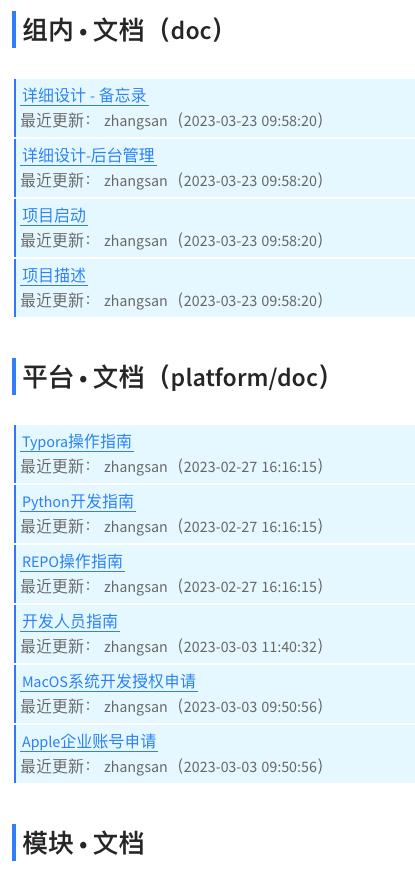
**DOC:**扫描工程下所有文档文件,在跟目录下生成 <span style='color:blue;'>doc.md</span> 文档索引文件
该文档为当前代码组文档索引文件,扫描代码组所有
git的目录下的doc目录文档文件:1)文档名称和标题(
md格式解析文档首行标题,其他格式解析文件名) 2)文档git最近更新记录 3)最近三天修改的文档标记为【新】
工程解析
解析代码组当前目录的各git库工程属性信息
$ wing -project
执行成功后,并输出结果:${SPACE PATH}/out/project.json。
Git命令
git的命令不受影响,wing会遍历工作空间的所有git库,并执行此命令。